Showing posts with label troubleshooting. Show all posts
Showing posts with label troubleshooting. Show all posts
30 May 2017

22 March 2017
17 March 2016
11 May 2013
How to remove Transcend USB write protected error

step 1: Visit Support | TranscendUSA.com
step 2: Search with your product model and select the product which is same or similar to your pendrive
step 3: Download mFormat utility . Enter your serial no. of your pen drive .
Note: if you dont have a serial , then try with this no. 1456784523
step 4: Run the mFormat utility and format your pendrive .
Done.
Official Website of Transcend : www.TranscendUSA.com
For more details , visit : kioskea.net

(If you found this article useful then share with your friends.)
29 May 2012
How to Turn On Task Manager when Disabled in Windows XP
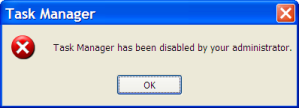 To turn on disabled Task Manager in Windows XP:
1. Go to Start =>> Run .
2. Type : gpedit.msc and Click OK.
3. Group Policy window will open.
4. On the left tree , under Local Computer Policy , Expand the User Configuration =>>Administrative Template=>>System =>>Ctrl+Alt+Del
5. On the right side , select Remove Task Manager
6. Under setting tab , choose Enabled and click OK.
Done
Note: This steps may not work if gpedit.msc is not accessible.
(If you found this article useful then share with your friends.)
Subscribe to:
Posts (Atom)